Sunday, June 13, 2010

Net Neutrality Graph

Following on the graph of Metcalfe's Law from last week, here is a take on network externalities, a graph that I've adapted from the article by Stan Leibowitz and Stephen Margolis in the Handbook of Telecommunications Economics (vol. 1, copyright 2002).


The interesting difference between this graph and Metcalfe's graph is that, for Metcalfe, the value of the network is rising exponentially while the marginal cost of adding another user rises linearly, but in the Leibowitz and Margolis version of the story, marginal benefit rises linearly while marginal cost rises exponentially.

Today's graph is basically a standard externalities graph, labeled to make it apply to a situation where network effects have become externalities that lead to the network being too small. This issue of network size is important; since the value of the network derives from the other users of the network, you want to keep adding as many people to the network as you can, until the cost of reaching the people still outside is greater than the extra value they would bring. If the network is too small, then we all lose out.

But as important as the question of network size is, it isn't really my biggest concern about goods with strong network effects. For me it's a matter of how all that network value gets shared between network owners and network users. Call me biased (I don't own a network of any commercial significance), but I want the lion's share of the network value to go to the users. But more on that later.

So far as Inkscape is concerned, I found a nice video on Youtube showing how to do superscripts and subscripts (along with text kerning) in Inkscape. The process isn't as automagic as you would find in most commercial Windows programs that deal with text, such as Illustrator, Indesign, or Word, but it's also not hard to do, and Inkscape will do everything I need it to, and more.

Saturday, June 12, 2010

No Google Sketchup for Linux?!


I'm a little surprised that Google has not made Sketchup available for Linux. I thought part of the idea behind web services like Google Docs was to make computing a little less OS dependent, so as to weaken the grip of Microsoft on computing.

I'm not complaining though. Google has done plenty to advance the FLOSS cause, and I can't recall ever giving them a dime for any of it. Still, I need to find out where to write just to make them aware of the fact that I would like to see Sketcher for Linux.

Friday, June 11, 2010

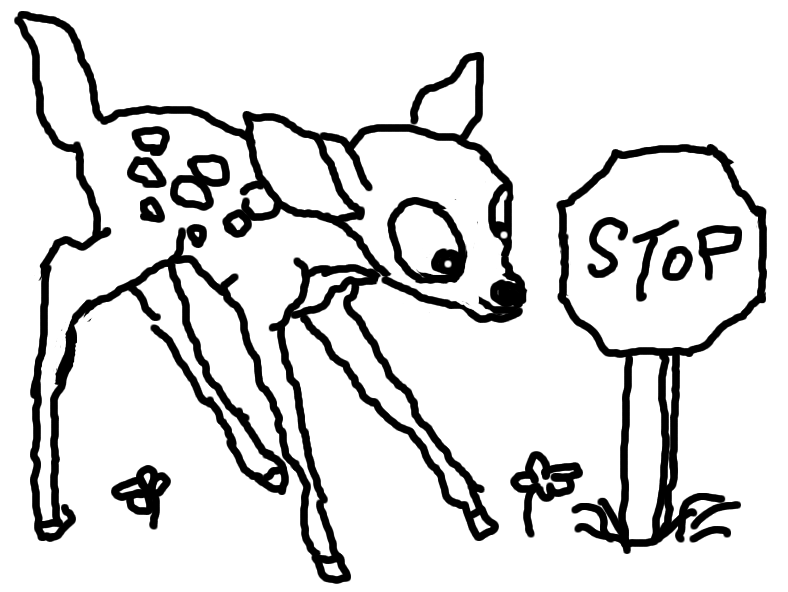
The Bicycle, the Fawn, and the Stylus

I felt the need to document a close encounter I had with a fawn while on my bicycle today. Normally I would just take a picture with my cellphone, but I felt that stopping to pull out my phone would have needlessly alarmed the little thing, which was standing there, two feet away from me. So, if photography is ruled out, the fallback has to be sketching with the Gimp!

The first step was a quick stop at Google images to find a picture of a fawn, and what fawn better than Bambi? I'd show you the picture, but I'm terrified of Disney's lawyers (may Michael Eisner and Roy Disney rot in hell). Hold it, I could show the picture to you if I used it for purposes of parody. Hmmm, may be a post idea there for later.

In any case, I opened my downloaded jpg in the Gimp and opened a second, transparent layer on top of it and began tracing. Of course, tracing an image on a laptop touchpad with your finger is so awkward that it's almost just not worth the effort. But I was saved by instructions I found on the web about how to build a homemade touchpad stylus.

There are a variety of instructions out there for your DIY touchpad stylus, ranging from the unexpected (superfine steel wool for the nib) to the strange (a bit of sponge for a nib, that you dip into water, as if you were going to watercolor on your touchpad). But the common element that all of these instructions have is the use of aluminum foil running along the length of your stylus to conduct electricity from your fingers to the touchpad (who knew?). When I later found how (here) that I could cover the aluminum foil on the tip with Scotch tape to protect the touchpad, then I was in business.

It took about ten minutes to take an unsharpened pencil and cut a little angle off the end with a kitchen knife, then wrap some foil over the angled end and cover the foil with tape. Voila! It's not pretty, but it did the job.

Armed with my new weapon of mass creation, it was simple to trace over Disney's Bambi. Well... simple, but not good. But I patiently followed the absolutely disastrous first round of tracing with a few minutes of correction, moving back and forth between Gimp's paintbrush and eraser tools, bit by bit, until I had something that I believe is recognizable as a small deer. And so, without further ado, I give you ...

Thursday, June 10, 2010

First Inkscape Graph: Metcalfe's Law

Hello World. Here is my first stab at a graph made in Inkscape. It's a duplication of the famous* slide by Bob Metcalfe where he originally presented his contention that the value of networks increases exponentially with the increase in the number of users. His statement is now called Metcalfe's Law, and is the foundation of the theory of network effects in economics. Here is a fun and spirited defense of the law against critics, by Metcalfe himself.

As the foundation of the theory of network effects, Metcalfe's law is very important to my own economics. So I've played with Inkscape here re-creating Metcalfe's original 35 mm slide. This is all just freehand, as befits a graph that is illustrating a concept rather than showing an actual, measurable quantitative relationship. As Metcalfe himself points out, it is very hard to specifically define, let alone measure, something like network "value."

Tuesday, June 8, 2010

Manning book downloads

One thing I love about Manning Publications is that they offer their books for download as pdfs at a good discount. I didn't want to pay $36 for a print copy of their Gnuplot in Action, but $23 for a pdf hits my sweet spot. O'Reilly offers pdf versions of their books, but the discount I just saw on one of their graphics books was $4.00. Sorry, no sale.

Sunday, June 6, 2010

Grabbing a Still Photo from a Movie

I really had no idea how easy this is in Linux.

I assumed that I needed an actual video editing program in order to grab a still image from a movie, but I was so wrong. To my surprise, that capability is built right into the VLC movie player that I use to watch iso files ripped from DVDs. You just pause the movie, and then use the Snapshot command under the Video menu. Voila! There's your still.

For myself, I want to use these stills as models to draw over within Gimp or Inkscape, but for a description of other legitimate purposes see the Stanford University guide to fair use.